Reviewed · TOKYO
Japan: eSIM with Unlimited Local 4G/5G Data
Japan travel gets easier with a tap, thanks to this unlimited 4G/5G eSIM for Honshu. I like the QR-code activation that gets you onto Japan’s KDDI(au) network quickly, and I like the flexibility to choose Ultra (unthrottled) or Lite (max 10 Mbps). One catch: the QR code in your GetYourGuide voucher is not the eSIM QR, so you need the email code (sent 1 day before) to make it work.
Plan on installing and activating the eSIM yourself, then letting it connect once you arrive in Japan. It’s a data-only setup (no voice or SMS), but it covers what most of us actually need: maps, translation apps, ride-hailing, and messaging via apps.
In This Review
- Quick hit checklist
- What This Japan eSIM Really Changes for Your Trip
- Ultra vs Lite: Choosing the Right Speed and Data Rules
- Ultra plan (3 to 30 days)
- Lite plan (3 to 10 days)
- Lite’s speed-and-data reality check
- QR Code Timing: Voucher vs Real eSIM Code
- When the eSIM Actually Connects in Japan
- Coverage and Speed: Expect 5G, But Don’t Bet Your Day on It
- Hotspot Sharing: Great Idea, Know the Limits
- No Calls or SMS: How to Make a Data-Only Plan Work
- Device Compatibility Checklist Before You Buy
- Price and Value: Is $10 Fair for Unlimited Japan Data?
- Timing and Day-Counting: How Lite Calculates Usage
- Who Should Book This eSIM (and Who Might Want Something Else)
- Should You Book This Japan Unlimited eSIM?
- FAQ
- When will I receive the eSIM QR code?
- Is the QR code in the GetYourGuide voucher the eSIM QR code?
- How can I tell if my phone supports eSIM?
- What should I do if the app says the QR code is invalid?
- When will the eSIM connect to the local network?
- Does this eSIM include voice calls and SMS?
- Can I use hotspot sharing (tethering)?
Quick hit checklist
- Two plans, two realities: Ultra is unlimited unthrottled local data; Lite is unlimited local data capped at 10 Mbps
- Real network, KDDI(au): coverage runs on Japan’s major carrier network for straightforward city and highway use
- Voucher QR is a decoy: the eSIM QR arrives by email 1 day before, separately from the voucher
- Setup troubleshooting is built in: if a QR code fails, you check Settings first for a new eSIM entry
- 5G can switch to 4G: indoor/underground/crowds may reduce 5G, but the plan still runs
- Hotspot works with limits: tethering is supported, but limitations vary by chosen plan
What This Japan eSIM Really Changes for Your Trip
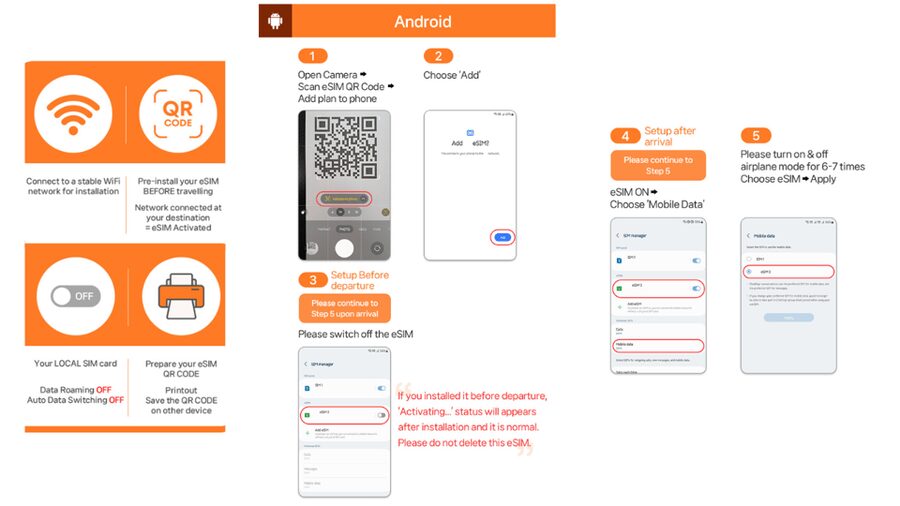
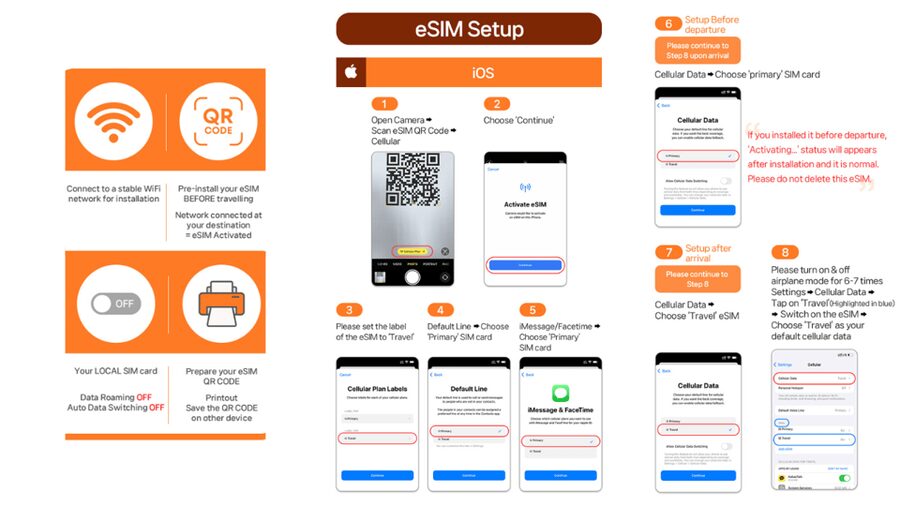
This is a Japan eSIM built for one job: keeping you connected to local data without hunting for a physical SIM at the airport. You install the eSIM using a QR code you receive by email, and then your phone connects to Japan’s local KDDI(au) network after you arrive.
For me, the big value is how quickly this removes friction. Instead of juggling Wi-Fi passwords, searching for pickup counters, or swapping SIM cards mid-trip, you get local data right when you need it. That matters in Japan because directions, schedules, and transit updates can hit you fast—especially when you’re switching trains, walking between stations, or checking platform info.
The other practical win is plan choice. Ultra makes sense if you rely heavily on data (navigation all day, uploading pictures, video calls in a pinch). Lite is for lighter use where you’ll be fine with a speed cap.
Readers booked these Tokyo options in the same breath. Here is how each one scored:
- Mt Fuji and Hakone 1-Day Bus Tour Return by Bullet Train
★ 5.0 · 26,383 reviews - 1-Day Tokyo Bus Tour
★ 5.0 · 14,250 reviews - Tokyo: teamLab Planets TOKYO Digital Art Museum Entry Ticket
★ 4.6 · 9,779 reviews - Mt Fuji & Hakone Cruise, Drum Show Bullet Train 1 Day from Tokyo
★ 4.0 · 7,413 reviews
Ultra vs Lite: Choosing the Right Speed and Data Rules
Both options are sold as unlimited local data on Japan’s network, but the fine print is where you should choose carefully.
Ultra plan (3 to 30 days)
- Unlimited 5G/4G local data with no throttling
- Voice & SMS: N/A (data only)
- Hotspot sharing: supported with limitations (the exact limits aren’t spelled out in the info, so plan for some constraint)
If you’re the type who always has maps running, shares location, and leans on apps that move lots of data, Ultra is the safer bet. You’re paying for fewer “will this be slow?” moments.
Lite plan (3 to 10 days)
- Unlimited 5G/4G local data, but max speed 10 Mbps
- Voice & SMS: N/A
- Hotspot sharing: supported with limitations
Lite is often a good fit for short trips, quick messaging via apps, basic photo sharing, and navigation. If you expect lots of video streaming or large uploads, 10 Mbps can feel slow.
Lite’s speed-and-data reality check
Lite still says unlimited data, but the plan also provides a hotspot/data calculation table. That table lists data allowances by calendar day (see below in the “Timing and day-counting” section). Practically: Ultra is the simpler experience if you want to avoid thinking about usage too much.
- Tokyo: Shinjuku Food Tour (13 Dishes at 4 Local Eateries)★ 5.0 · 6,603 reviews
- Tokyo Mt Fuji 5th St & Hakone Cruise Bus Tour w/Bullet Train★ 4.4 · 5,024 reviews
- Flagship 2-Hours Official Street Go-Kart Tour – Tokyo Bay Shop★ 5.0 · 4,974 reviews
- From Tokyo: Mount Fuji Full-Day Sightseeing Trip★ 4.5 · 4,970 reviews
- Tokyo: Hop-On Hop-Off Sightseeing Bus Ticket★ 3.9 · 4,207 reviews
QR Code Timing: Voucher vs Real eSIM Code
Here’s the most important logistics piece: the QR code in your GetYourGuide voucher is not the eSIM QR code.
Your real eSIM QR code gets delivered to you separately via email 1 day before the activity date. That means:
- Don’t try to scan the voucher QR and expect it to install the eSIM.
- Watch your email in advance, and keep an eye on your inbox the day before you plan to use it.
If you see an error like QR code is invalid, don’t panic. Start by checking your phone’s SIM/eSIM list in the exact place your phone manages connections:
- iOS: Settings > Cellluar (spelled like that in the info) and check the Cellular page for a new eSIM
- Android: Settings > Connections > SIM Manager and check for a newly added eSIM
Then contact the supplier by email or WhatsApp if it still won’t take. This matters because once the eSIM QR has been sent, refunds aren’t accepted—so it’s better to troubleshoot early than late.
When the eSIM Actually Connects in Japan
Another detail that saves stress: the eSIM connects to the local network after you have arrived in Japan.
That means you can’t treat this like a universal “install anywhere and roam instantly” ticket. Plan your arrival so you have time to install the eSIM on your phone when you land, then connect to KDDI(au). If you’re traveling with someone else, this is also where you can sync up: whoever arrives first can get the maps working, and you can coordinate from there.
Also note the QR code rules:
- The eSIM QR code must be installed and activated within 30 days of purchase
- The plan duration is 3–30 days depending on Ultra or Lite selection
If you travel later than expected, you don’t want the QR code to expire while you’re still planning.
Coverage and Speed: Expect 5G, But Don’t Bet Your Day on It
This eSIM runs on KDDI(au), and the plan covers Japan. In normal use, you should expect strong performance in cities and along rail routes.
That said, you shouldn’t assume 5G everywhere. The info is explicit: 5G signal can be affected by location, including indoors, underground, or crowded areas. When that happens, your phone may switch to 4G.
This is exactly what you want from a real travel data plan: it should keep you connected even if the signal type changes. And in practice, the setup is reported as usable even on subway rides, with the general pattern being stable connectivity plus 5G-to-4G switching where needed.
One more thing: performance depends on your phone. A faster phone can take advantage of higher speeds when available, but the plan rules still govern the ceiling:
- Ultra: unlimited local data with no throttling
- Lite: unlimited local data capped at 10 Mbps
Hotspot Sharing: Great Idea, Know the Limits
Yes, hotspot/tethering is supported. The included info says hotspot sharing works with limitations depending on the selected plan.
That’s a heads-up, not a deal-breaker. Use hotspot when:
- your tablet needs data
- you’re traveling with a partner who doesn’t have their own eSIM
- you want your laptop to update offline maps before you head out
But don’t assume you’ll get the same experience as your home broadband, especially on Lite. If hotspot is a must-have, Ultra is usually the better bet because it avoids throttling on the plan’s baseline data behavior.
If you’re planning to rely heavily on tethering for work, I’d treat this as “good for getting online,” not “wired replacement.”
No Calls or SMS: How to Make a Data-Only Plan Work
This eSIM is data only. Voice & SMS are listed as N/A.
For most modern travel, that’s fine because you can:
- use WhatsApp, iMessage, or similar for messages
- use app-based calls (FaceTime/WhatsApp) if needed
- get confirmations and OTPs only if your services support data-based flows
Before you go, sanity check what you use SMS for. If you depend on SMS for banking logins or ticket verification, you’ll want a backup plan (like having access to Wi-Fi at key times or confirming your accounts accept app-based verification).
If you don’t rely on SMS, this restriction becomes almost invisible—and the money you save goes right to data.
Device Compatibility Checklist Before You Buy
Don’t wait until you’re at the airport to find out your phone can’t do eSIM.
Do these checks first:
- Make sure your phone is SIM-unlocked for a foreign eSIM/SIM
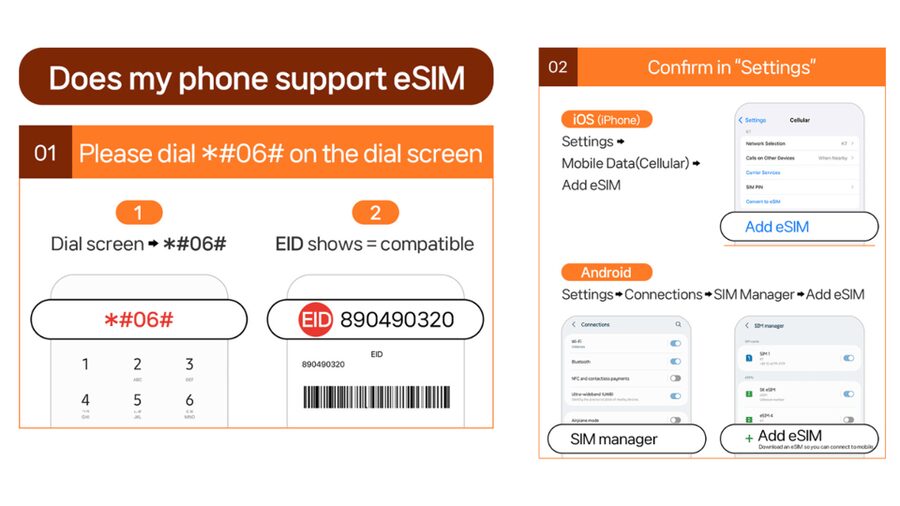
- Confirm eSIM support:
- Press #06# on the dial screen
- Check whether “EID” shows
- If EID isn’t showing, the info says your device is incompatible with eSIM
Also look at the product photos before purchase, since the info suggests that compatibility is visually indicated.
This is where people can lose time. I’d rather you spend five minutes checking compatibility now than lose an hour later staring at settings.
Price and Value: Is $10 Fair for Unlimited Japan Data?
The price starts at $10 per person (Honshu, Japan). For an unlimited local data plan, that’s the kind of cost that usually pays for itself the moment you stop searching for Wi-Fi or worrying about “data overage.”
But the better way to judge value is by how you’ll use it.
Choose Ultra value if:
- you use navigation constantly
- you send lots of photos
- you want fewer speed worries
- you might hotspot a second device
Choose Lite value if:
- you mostly need messaging, maps, and browsing
- you can live with capped speed at 10 Mbps
- your trip fits within Lite’s 3–10 day duration range
If you’re traveling shorter and your phone usage is modest, Lite often hits the sweet spot. If you’re traveling longer or you want the smoothest experience, Ultra usually offers the “set it and forget it” comfort.
Timing and Day-Counting: How Lite Calculates Usage
Lite includes a usage calculation note that’s worth understanding because it affects how long your allowance effectively covers you when tethering is involved.
The info says usage is calculated based on calendar days, starting from the first connection to the KDDI(au) network in Japan. Example given: activation at 10 PM Japan time counts as 1 full day by midnight.
It also provides a hotspot/data calculation table:
- 3-day: 3GB
- 4-day: 3GB
- 5-day: 4GB
- 6-day: 5GB
- 7-day: 6GB
- 8-day: 7GB
- 9-day: 8GB
- 10-day: 9GB
- 15-day: 15GB
- 20-day: 19GB
- 30-day: 30GB
Why you should care: if you plan to hotspot heavily, the Lite plan’s day-count rule can matter more than the “unlimited” headline. Ultra is the simpler mental load here.
Who Should Book This eSIM (and Who Might Want Something Else)
This works best for you if:
- you want local 4G/5G data on arrival without a physical SIM card
- you’re comfortable installing an eSIM yourself
- you mainly need data for apps (not SMS/voice)
- you want the option to choose Ultra for unthrottled speeds or Lite for capped speeds
It might not be the best fit if:
- you need lots of SMS/voice services (since those aren’t included)
- you don’t have an eSIM-compatible device
- you need reliable speed for heavy video streaming over hotspot (Lite’s 10 Mbps cap and tethering limits could frustrate)
Also, one practical note from the general feedback pattern: people like the simplicity, but some wish there were more duration choices. If your trip length is in an awkward middle, double-check Ultra vs Lite durations before you commit.
Should You Book This Japan Unlimited eSIM?
If you’re headed to Japan (Honshu) and you value hassle-free connectivity, I’d book it—especially if your phone is eSIM-capable and you’re comfortable doing the install. The biggest reason is the combination of unlimited local data with a straightforward QR process and KDDI(au) coverage.
I’d lean Ultra if you want the least “data anxiety,” plan to hotspot sometimes, or you’ll use your phone as your main travel tool all day. I’d lean Lite if your trip is short, your data habits are moderate, and you’d rather spend less while still getting solid everyday coverage.
Before you buy, do these two things:
- confirm eSIM support using #06# and EID
- plan to use the emailed QR code (voucher QR won’t work)
If those are true, this is the kind of setup that keeps your travel day smooth.
FAQ
When will I receive the eSIM QR code?
The eSIM QR code is delivered to you separately via email 1 day before the activity date.
Is the QR code in the GetYourGuide voucher the eSIM QR code?
No. The voucher QR code is not the eSIM QR code. You need the eSIM QR code that arrives via email.
How can I tell if my phone supports eSIM?
Dial *#06# and check whether “EID” appears. If EID is not shown, the device is incompatible with eSIM.
What should I do if the app says the QR code is invalid?
Check your phone settings for whether a new eSIM appears:
- iOS: Settings > Cellular
- Android: Settings > Connections > SIM Manager
If it still doesn’t work, contact the supplier through the email or WhatsApp provided.
When will the eSIM connect to the local network?
The eSIM connects to the local network after you arrive in Japan.
Does this eSIM include voice calls and SMS?
No. Voice & SMS are listed as N/A. It’s a data-only eSIM.
Can I use hotspot sharing (tethering)?
Yes, hotspot sharing is supported, but it comes with limitations depending on whether you choose the Ultra or Lite plan.
More Tour Reviews in Tokyo
- Mt Fuji and Hakone 1-Day Bus Tour Return by Bullet Train
★ 5.0 · 26,383 reviews - 1-Day Tokyo Bus Tour
★ 5.0 · 14,250 reviews - Tokyo: teamLab Planets TOKYO Digital Art Museum Entry Ticket
★ 4.6 · 9,779 reviews - Mt Fuji & Hakone Cruise, Drum Show Bullet Train 1 Day from Tokyo
★ 4.0 · 7,413 reviews - Tokyo: Shinjuku Food Tour (13 Dishes at 4 Local Eateries)
★ 5.0 · 6,603 reviews