Reviewed · TOKYO
Unlimited WiFi Router – Haneda Airport (Tokyo) Pickup
Arriving in Tokyo with zero data is a special kind of annoying. This Haneda Airport WiFi pickup is all about fixing that fast, so you can map your route, coordinate plans, and avoid the classic first-day scramble. I like that the pickup window is wide and that the device is built for on-the-go use right from the arrivals area, including 4G LTE access. I also like that it’s designed to handle multiple devices at once—up to 10 devices—which matters for families and small groups.
The main thing to watch is the fine print on speed: even though it’s advertised as unlimited, high-speed data is limited to 3GB per day. If your plan is heavy video streaming all day, you’ll want to think about how you’ll use bandwidth.
In This Review
- Key Things I’d Plan Around
- Haneda WiFi Pickup: Where You’ll Actually Start
- A tip that can save time
- Using the Router Once You Land: What Unlimited Really Means
- What you can realistically do with it
- Device count: Great for groups, but confirm expectations
- What’s in the Box: Power Bank and Small Comforts
- Timing and Drop-Off: How to Avoid the Last-Minute Panic
- A practical warning from common airport reality
- What This Means for Your First Day in Tokyo
- Cost and Value: Is This Worth $14.48?
- When it’s a clear win
- When it’s only okay
- Group Size and Practical Limits
- Service Quality Signals: What You Should Expect at the Counter
- Should You Book This Haneda Unlimited WiFi Router?
- FAQ
- How long can I use the WiFi router?
- When can I pick up the router at Haneda?
- Where do I collect the router?
- How many devices can connect to the router?
- Is the WiFi truly unlimited?
- Do I get any extra items with the router?
- Where do I return the device?
- What if I miss the pickup?
- Can I cancel for free?
Key Things I’d Plan Around

- Pickup runs from early morning to late night at Haneda, so you’re less likely to land at a bad hour.
- NINJA WiFi counters are your target, and they’re set up in the arrivals areas outside security.
- Connect up to 10 devices (and double-check any “5 devices at once” wording for your group size).
- High-speed data is capped at 3GB/day, so you may still have to manage streaming.
- The router lasts up to 90 days, which works for longer Japan stays.
- Return timing matters, especially if your flight leaves late or early.
Haneda WiFi Pickup: Where You’ll Actually Start
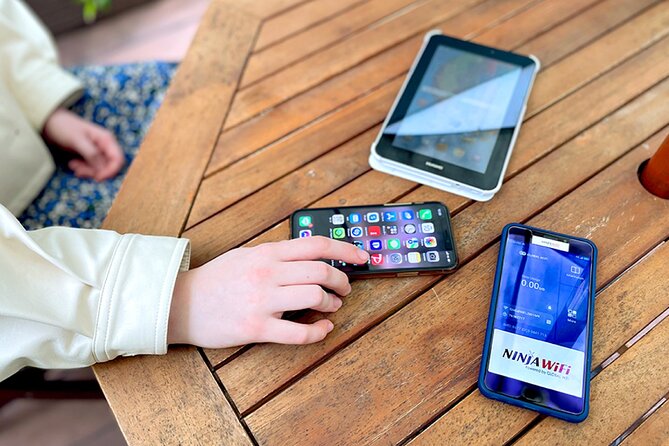
Let’s talk about the part that can make or break your first 60 minutes in Tokyo: getting your router in hand.
This service gives you a mobile ticket, and you collect the WiFi device at Haneda Airport between 6:45am and 11:45pm. Your job is simple: head to the arrivals area and find the NINIJA Wi-Fi counter. The pickup is designed for quick handoffs so you can start using internet as soon as you step into the Tokyo airport bubble.
One detail that’s genuinely useful in practice: the counters are outside airport security, and they’re near public transportation. That means you’re not doing a stressful “airport maze” run to a gate area. It’s also helpful if you’re arriving and thinking about how to get to your hotel and need maps immediately.
There are separate counter locations depending on which terminal you’re using:
- Terminal 3: pickup/return counter in the arrivals lobby, plus a return box option for overnight returns
- Terminal 2: pickup/return/return box at the arrivals lobby counter
If you’re traveling with more than one person, this is one of those moments where you should slow down for 30 seconds and confirm you’re at the correct terminal. In airports, the “right counter” detail matters more than you’d think.
Readers booked these Tokyo options in the same breath. Here is how each one scored:
- Mt Fuji and Hakone 1-Day Bus Tour Return by Bullet Train
★ 5.0 · 26,383 reviews - 1-Day Tokyo Bus Tour
★ 5.0 · 14,250 reviews - Tokyo: teamLab Planets TOKYO Digital Art Museum Entry Ticket
★ 4.6 · 9,779 reviews - Mt Fuji & Hakone Cruise, Drum Show Bullet Train 1 Day from Tokyo
★ 4.0 · 7,413 reviews
A tip that can save time
Bring your reservation confirmation and passport information with you. People report the process is quick when they can show the reservation form and passport without delays.
Using the Router Once You Land: What Unlimited Really Means
This is a 4G LTE hotspot router meant to keep you connected across Japan. The big promise is unlimited usage with a long rental window—up to 90 days—and a clear promise that you can use it right away after pick-up.
But here’s the practical truth: the description also states that high-speed data is limited to 3GB per day. After you hit that limit, your experience may still work but could slow down. That’s common with “unlimited” data models, and it’s worth planning around.
What you can realistically do with it
With 4G LTE access, you can typically rely on your router for:
- Google Maps for getting around
- social apps for communication
- YouTube and other video sites, though heavy viewing could eat up your daily 3GB high-speed quota quickly
If your travel style is mainly navigation, messaging, and occasional browsing, this setup is a great match. If your travel style is constant video streaming, hotspotting, and uploading content all day, you’ll want to treat the 3GB/day number as your budget.
Device count: Great for groups, but confirm expectations
The info you’re given says this can connect up to 10 devices, which is great when multiple phones and tablets are in play. Still, another part of the description mentions up to 5 devices at once. That contradiction matters for planning.
So here’s what I’d do: if you’re bringing a group of 8–10 active devices, assume performance could vary and keep at least a few devices off the hotspot unless you really need them. That way you don’t end up with a frustrating “some devices won’t connect well” situation.
- Tokyo: Shinjuku Food Tour (13 Dishes at 4 Local Eateries)★ 5.0 · 6,603 reviews
- Tokyo Mt Fuji 5th St & Hakone Cruise Bus Tour w/Bullet Train★ 4.4 · 5,024 reviews
- Flagship 2-Hours Official Street Go-Kart Tour – Tokyo Bay Shop★ 5.0 · 4,974 reviews
- From Tokyo: Mount Fuji Full-Day Sightseeing Trip★ 4.5 · 4,970 reviews
- Tokyo: Hop-On Hop-Off Sightseeing Bus Ticket★ 3.9 · 4,207 reviews
What’s in the Box: Power Bank and Small Comforts
This rental isn’t just the router. It’s bundled with the practical items that keep you from hunting for accessories at the airport:
- the WiFi router (4G LTE hotspot)
- a USB cable and adapter
- a WiFi pouch
- a free power bank
That power bank is a big deal for travel days. Airports, arrival lobbies, and early commutes eat battery. Having extra power means you can keep your phone alive while you do what you need to do: check maps, check transit, message your group, and confirm hotel directions.
Also, having the pouch is underrated. It sounds minor, but a little organization helps when you’re moving fast from airport to train to hotel. You’ll know where the device is, and you’ll avoid the “where did we put the router” stress.
Timing and Drop-Off: How to Avoid the Last-Minute Panic

The rental is designed for longer trips, but the most common issue isn’t the technology—it’s timing.
Pickup and return options vary by terminal, and there are return box possibilities for late-night changes. One description specifies return options around midnight hours with a return box in the arrivals lobby area.
If your flight times are unusual—like very early departures—you should plan your return with the airport hours in mind. You do not want to be trying to locate a return counter after you’re already stressed and rushing through travel steps.
A practical warning from common airport reality
Some people report that directions on maps can be confusing, and the drop-off location may be the same general spot as pickup. The takeaway is simple: don’t trust a random navigation pin blindly. If you can, glance at signage on arrival and verify you’re in the right arrivals lobby area for your terminal.
What This Means for Your First Day in Tokyo

This kind of WiFi rental shines on “day one” because it removes uncertainty. You land, you step out, you need:
- maps that actually match where you are,
- transit and transfer info,
- coordination with anyone else who’s traveling,
- hotel address checks when a taxi driver asks for a street name.
A stable connection helps you make good decisions quickly. And in Japan, quick decisions are often the difference between smooth transit and wasted time.
It’s also useful for day trips. People specifically mention using it for visits like the Disney parks in Tokyo and feeling confident the connection would hold up for the day.
If you’re doing a lot of sightseeing on your own, or you’re trying to follow a route without relying on pre-downloaded maps, this router can make Tokyo feel more manageable. You’re not stuck guessing or waiting for someone else’s phone to load a map.
Cost and Value: Is This Worth $14.48?

You’re looking at a price of $14.48 per person, and it’s commonly booked about 24 days in advance. Duration is flexible—listed as 3 to 30 days—and the device can last up to 90 days, which is more generous than the usual short-term airport WiFi rental.
Here’s how I’d judge value:
When it’s a clear win
- You need reliable access from the moment you land.
- You’ll have multiple people using one device (the multi-device capability helps).
- You’re planning to use maps and communication heavily for the first days at least.
When it’s only okay
- You mainly need occasional messaging and can rely on offline maps.
- Your daily internet use is mostly entertainment heavy (because the 3GB/day high-speed limit can impact video-heavy days).
For most visitors, value comes from eliminating the “airport tech gap.” If you’ve ever had to negotiate trains with bad signal or hunt for WiFi while hungry and tired, you know why this can feel worth it even when you’re watching the price.
Group Size and Practical Limits

This experience is capped at a maximum of 10 travelers. For this type of service, that mostly hints that it’s meant to run as a standard rental operation rather than a custom guided setup. In other words: you should expect an efficient, counter-based handoff, not a long staffed experience.
Your real limit won’t be “group size.” It’ll be:
- how many devices you plan to connect,
- whether you’ll hit the daily speed cap,
- whether you’ll return on time.
Service Quality Signals: What You Should Expect at the Counter

A few recurring points show up in how people describe the process.
The positives:
- pickup can be easy if you show the reservation form and passport
- the connection is often ready quickly, with dependable performance while sightseeing
The friction points:
- signage and maps can be misleading in the airport, so you may need to rely on what you see in the arrivals lobby
- English support can be limited at the counter, especially if you run into a documentation mismatch or need help recovering an email
My advice: if you’re even slightly worried about having to “explain something,” save your reservation details offline. Screenshot the confirmation and keep your passport accessible. Then you’re not depending on the counter staff to solve a digital issue under pressure.
Should You Book This Haneda Unlimited WiFi Router?
I’d book it if you want a no-stress arrival. This rental is built for the moment you land—wide pickup hours, a counter outside security, and a setup that’s meant to get you online right away.
I’d skip it, or at least reconsider, if:
- your plan is mostly entertainment streaming with lots of hotspotting,
- you’re uncomfortable managing a daily high-speed cap,
- you already know you’ll rely heavily on offline maps and won’t need data much.
For solo travelers and couples, it often feels like paying for peace of mind. For families or small groups, the multi-device support can make it a standout value—especially if you split costs and want everyone to stay connected for navigation and coordination.
If you want one reliable tool to handle Tokyo directions and keep your travel plans running smoothly, this is a strong option. Just respect the 3GB/day high-speed limit, and keep your terminal and return plan clear.
FAQ
How long can I use the WiFi router?
It’s described as usable for up to 90 days.
When can I pick up the router at Haneda?
You can pick up at the airport between 6:45am and 11:45pm. Counter hours also vary by terminal for pickup and return options.
Where do I collect the router?
You collect it at Haneda Airport at the arrivals area counters outside security, at the NINJA WiFi counter. Specific counter locations differ by Terminal 2 or Terminal 3.
How many devices can connect to the router?
The overview states it can connect to up to 10 devices, while another part of the description says up to 5 devices at once. You should plan your device count accordingly.
Is the WiFi truly unlimited?
Usage is described as unlimited, but high-speed data is limited to 3GB per day.
Do I get any extra items with the router?
Yes. It includes the router, USB cable and adapter, a WiFi pouch, and a free power bank.
Where do I return the device?
Return is handled at the arrivals area counters outside security, and there is also a return box option mentioned in the arrivals lobby areas depending on terminal and time.
What if I miss the pickup?
Refunds are not provided if you do not collect the WiFi router.
Can I cancel for free?
Yes. Free cancellation is available up to 24 hours before the experience’s start time for a full refund.
More Tour Reviews in Tokyo
- Mt Fuji and Hakone 1-Day Bus Tour Return by Bullet Train
★ 5.0 · 26,383 reviews - 1-Day Tokyo Bus Tour
★ 5.0 · 14,250 reviews - Tokyo: teamLab Planets TOKYO Digital Art Museum Entry Ticket
★ 4.6 · 9,779 reviews - Mt Fuji & Hakone Cruise, Drum Show Bullet Train 1 Day from Tokyo
★ 4.0 · 7,413 reviews - Tokyo: Shinjuku Food Tour (13 Dishes at 4 Local Eateries)
★ 5.0 · 6,603 reviews