
Reviewed · ASAKUSA & SENSOJI TOURS
Tokyo: Origami Fun for Families & Beginners in Asakusa
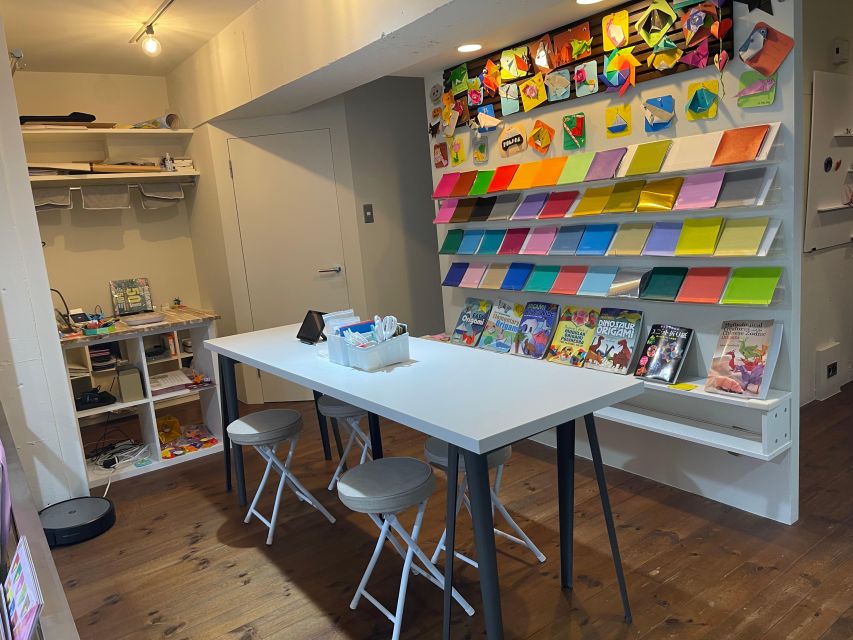
Origami in Asakusa is oddly calming. In just 45 minutes, you fold your way through 100+ models using a tablet guide and pick from 50 paper colors, all in a tidy studio that feels designed for beginners. What I like most is the relaxed pace and the hands-on practice time, not just watching instructions. A small catch: it is not a full teacher-led class, so you’ll rely heavily on the tablet steps.
I especially like that you can move at your own speed. The app lets you replay and go back, and staff are there to help with your folds if you get stuck. It also works well for families because kids can stay focused on a visual, step-by-step process.
One possible drawback is also the biggest practical one: you need socks and the place uses stairs with no ramps. If someone in your group has trouble with stairs or needs firm, back-supported seating, plan accordingly.
In This Review
- Key things to know before you fold
- What this Asakusa origami experience is really like
- Price and value: is $27 for 45 minutes worth it?
- The tablet-guided workflow: how you pick a model and start fast
- Paper colors and model variety: 50 shades, 100+ designs
- Studio setup and logistics: socks, stairs, and finding the door
- What happens during the 45 minutes (and how many models you can expect)
- Staff support vs. teacher-led instruction: when to ask for help
- Who should book this origami session in Asakusa
- Practical tips to get better results fast
- Should you book Origami Fun for Families & Beginners in Asakusa?
- FAQ
- What is the duration of the origami experience?
- How much does it cost?
- Is this experience beginner-friendly?
- Do I get to choose what I fold?
- Is there a teacher leading the class?
- What supplies are included?
- Do I need to bring anything?
- Is it suitable for young children?
- Can I take photos?
- Is the studio wheelchair accessible?
Key things to know before you fold
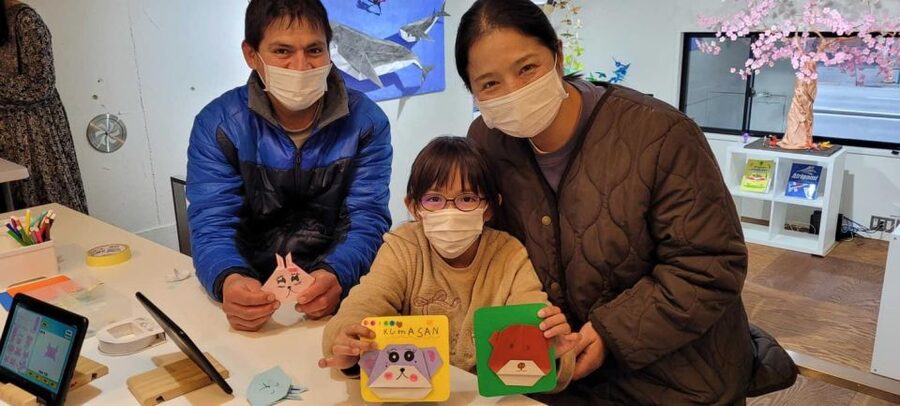
- Tablet menu for models: pick a design on-screen, then follow the steps to create it from a square sheet.
- 50 color options: choose paper color at the paper wall, then decorate your final piece.
- Small group size (up to 6): a quieter room and enough attention from staff without crowds.
- Beginner-to-intermediate range: some models are simple, others take a bit more care.
- Staff help, not a teacher-led lecture: you’ll get guidance, but you’re mostly learning by doing.
- Socks required: you’ll either bring them or buy a pair beforehand so you can participate.
What this Asakusa origami experience is really like
This activity is built for people who want the fun of folding without the stress of figuring out diagrams. You’re not stuck with a single model or a rushed demo. Instead, you choose your design and then follow a sequence on a tablet that takes you from a flat square to a finished animal, flower, or vehicle.
The best part is the structure. You start by selecting a model, then you move to paper, then you fold. That flow matters in a busy area like Asakusa because it turns a potentially chaotic “find the instructions and copy them” situation into a simple rhythm you can repeat.
Even though it’s beginner-friendly, it doesn’t feel babyish. The models range from basic to intermediate difficulty, so you can keep folding as long as you’re having fun, then switch to something easier if you want a confidence boost. The studio also encourages photos during your session, which makes it easier to share results the moment you’re done.
More temple mornings in old Asakusa
- Tokyo: Japanese Dance Cabaret Theater Asakusa-Kaguwa Ticket
★ 4.8 · 2,270 reviews - Tokyo: Meiji Shrine, Asakusa, Skytree Bus Tour and Cruise
★ 4.7 · 1,986 reviews - Tokyo: Roll and Authentic Sushi Making Class in Asakusa
★ 4.9 · 1,957 reviews - Tokyo: Asakusa Walking Tour with Sensoji Temple Visit
★ 4.8 · 1,583 reviews
Price and value: is $27 for 45 minutes worth it?
At about $27 per person for 45 minutes, you’re paying for a few things at once: your paper and supplies, the tablet-guided instructions, and the staff presence to help if a fold goes wrong. You also get taxes and fees included in that price.
For me, the value comes from two practical pieces:
- You’re not paying for a performance. You’re paying for repeatable practice time with a clear method.
- You can choose multiple models, so the session can turn into several finished keepsakes instead of one rushed souvenir.
A helpful clue from real family pacing: one small group made around four items each within the allotted time (for a 7-year-old and adults in the same session). That’s the kind of outcome that makes a 45-minute activity feel satisfying rather than stingy.
If you’re expecting a long, multi-class workshop or a private, teacher-led lesson, adjust your expectations. This is a “fold and iterate” session, not a studio course.
The tablet-guided workflow: how you pick a model and start fast
This is a tablet-based activity, so the entire experience is designed around that screen. Here’s the step-by-step approach you’ll follow:
First, you use the touchscreen menu to select your origami model. Categories help you find what you want quickly—so you’re not flipping pages or trying to decode instructions while everyone is waiting.
Next, you head to the origami paper wall to pick your color sheets. The guidance here is smart: choose keeping the design in mind. That tiny instruction helps because some models look better with certain colors, and it gives you a reason to think like a designer.
Then you return to the tablet, hit Play, and fold along. The app is flexible: you can replay or return to previous steps if your fold needs a do-over. That matters because origami mistakes are normal. One wrong crease can snowball fast, but replay makes correction easy.
Finally, you personalize your work. The tablet instructions encourage you to use stickers, stamps, and markers to decorate. It’s a small detail, but it turns a folded model into something that looks finished and playful, even if your folds aren’t perfect yet.
Paper colors and model variety: 50 shades, 100+ designs
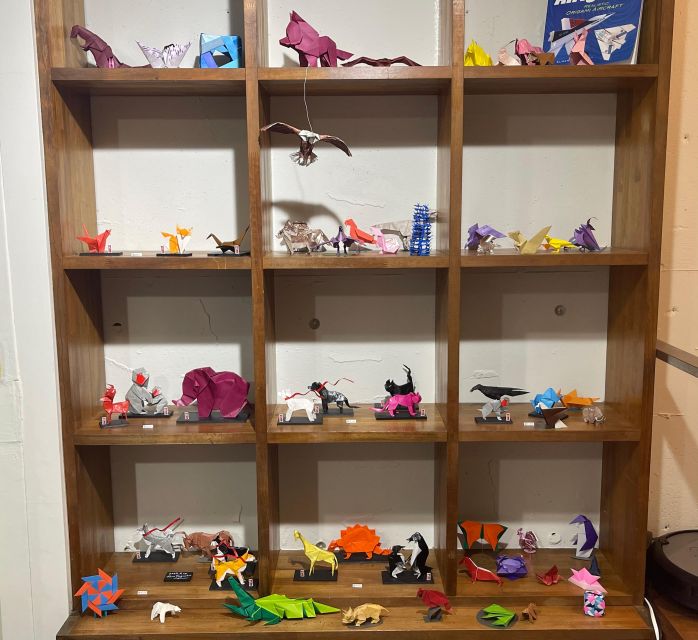
The studio’s selection is a big reason this works for both adults and kids. You’re choosing from 100+ origami models, plus 50 colors of paper. That variety is not just marketing—it affects how the session feels.
For families, it prevents the classic problem: kids can lose interest if there’s only one option or one slow demo. Here, if a child wants a different animal or a different car, you can switch without wasting the day.
For beginners, it gives you a learning path. You can start with something simple to build confidence, then move to a slightly more detailed model. And if intermediate steps feel too fiddly, you can drop back to something easier and keep the session fun.
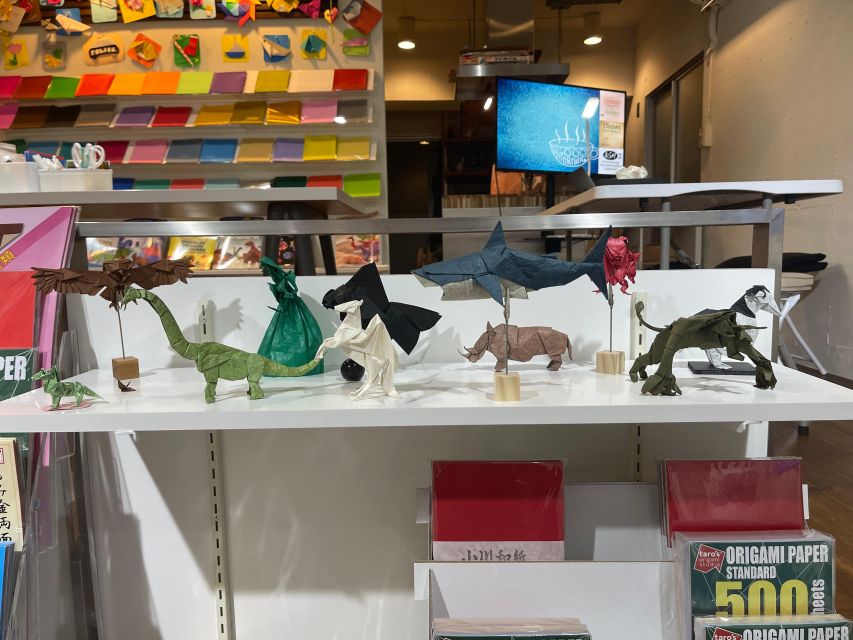
The model types you can expect include animals, flowers, and vehicles. That range is perfect in a tourist-heavy area like Asakusa because it helps you pick something you actually want to look at later—rather than just folding whatever is closest.
Studio setup and logistics: socks, stairs, and finding the door
This studio is in Asakusa and the location is straightforward once you know the cue. The entrance is on the main street side. If you’re near the park, don’t walk around back—there’s no entry there. Look for company signage on the front of the building and a brown sea turtle attached to the wall below the window. That detail is easy to spot and saves time when you’re in the middle of sightseeing.
Now for the practical non-negotiable: socks are required. You’ll need to bring socks to the studio or purchase a pair beforehand. If you forget, you’ll lose your start time while you sort it out, so I’d treat socks like a passport item.
Accessibility note matters here. The facility is not handicap accessible because there are stairs and no ramps or lifts. Seating also does not have back support. If your group includes anyone who needs back-supported seating or can’t manage stairs comfortably, think about alternatives.
On the good side, the vibe is designed for concentration. With a small group limited to 6, your folding space stays calmer than many family activities in central Tokyo.
More hands-on studios our readers booked
- Tokyo Shinjuku Chopsticks Making Class★ 5.0 · 1,763 reviews
- Chopstick Making Workshop in Ginza★ 4.8 · 1,366 reviews
- Kintsugi Experience: Art of Golden Joinery in Tokyo★ 5.0 · 467 reviews
- Tokyo Chopstick Making Workshop with Artisan★ 5.0 · 466 reviews
- Tokyo: Shinjuku Chopstick Making Class★ 4.9 · 440 reviews
What happens during the 45 minutes (and how many models you can expect)
This isn’t a “watch first, do later” setup. You get hands-on time right away after choosing your model and paper. Because the tablet can replay steps, you can pause, correct, and continue without needing to interrupt someone repeatedly.
A typical session rhythm goes like this:
- You choose a model and paper color.
- You fold with the tablet steps.
- You decorate your piece with stickers/stamps/markers.
- You can keep going if you want more models before the time ends.
- You can take photos during and after your session.
How many finished pieces you’ll get depends on difficulty and your group’s pace. One family group made about four items each during the session window, which suggests that multiple models are realistic—especially if you start with a beginner-friendly choice.
Also, the studio offers origami displays during and after your folding time. That gives your eyes something to enjoy while you work and helps you feel connected to the craft, not just completing a task.
Staff support vs. teacher-led instruction: when to ask for help
This is where the experience is very honest about expectations. It’s not a private teacher-led class. You’ll use the tablet instructions as your main guide. Staff members are present to help participants with their models, but your workflow is still mostly self-directed through the app.
So when should you ask for help? Ask early if:
- a crease keeps turning out wrong,
- you’re stuck at a step you can’t interpret visually,
- your paper isn’t folding neatly along the tablet’s sequence.
The studio also supports English and Japanese. That helps if your group includes one fluent English speaker, one Japanese speaker, or a mix. If you’re traveling with kids, staff support is especially useful for those moments when patience runs out and the next fold feels impossible.
One interesting detail from instructor stories: in some cases, an instructor created an extra model (like a rose) for a child, which boosted morale a lot. While you shouldn’t count on extra surprises, it’s a nice signal that the staff cares about the final experience, not just the completion of steps.
Who should book this origami session in Asakusa
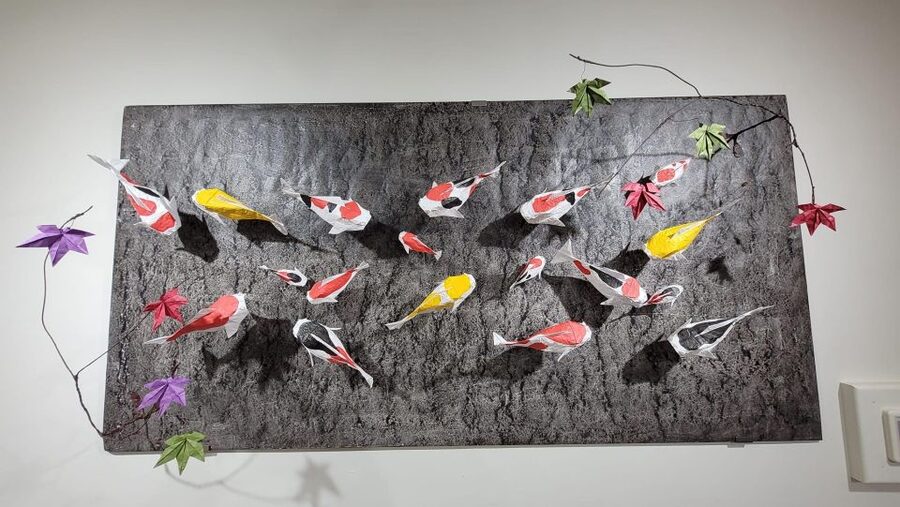
This activity is a great fit if you’re a beginner, a family traveling with kids, or an adult who likes structured, hands-on activities. It’s also smart for groups who want something creative to do that doesn’t depend on advanced language skills.
A few suitability points to keep in mind:
- Kids should be 4 years or older (recommended), and children under 5 need adult supervision throughout.
- Kids under 13 need adult supervision throughout the activity.
- People with a cold aren’t recommended to join.
- If someone can’t handle stairs, this may be difficult because it isn’t wheelchair accessible.
If you’re going as a couple or solo adult, it still works. You can take your time, choose a few models, and get a stack of paper crafts as souvenirs without the hassle of hunting down materials or translating diagrams.
Practical tips to get better results fast
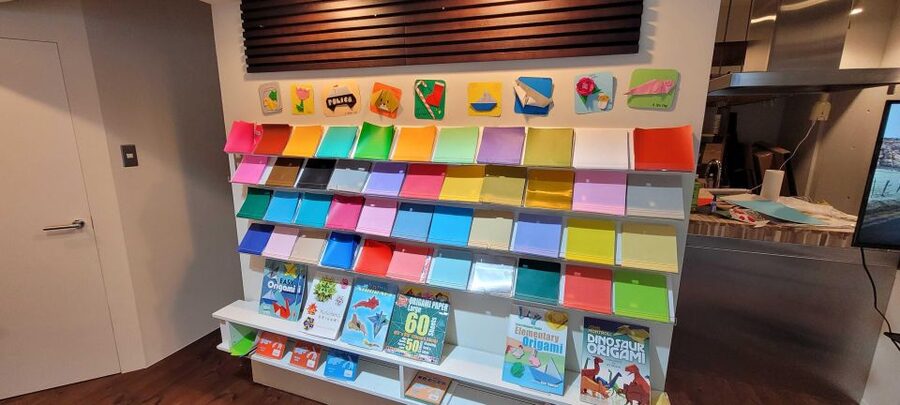
If you want your finished animals and vehicles to look crisp, a few small habits help.
First, choose paper color intentionally. The studio encourages this, and it’s not just aesthetic. Matching color to subject can make even simple folds look more intentional.
Second, start with one beginner-friendly model to learn the “language” of the tablet steps. Once you understand how the app sequences folds, the later models feel easier.
Third, don’t treat time as a race. The tablet lets you replay steps, and origami quality usually improves when you do one careful fold instead of rushing five.
Finally, plan your photos. Since you can take photos during the session, it’s worth snapping one before decoration and one after. That gives you a before-and-after memory of how much work went into each crease.
Should you book Origami Fun for Families & Beginners in Asakusa?
Book it if you want a structured, beginner-friendly craft experience that fits well into a sightseeing-heavy day in Asakusa. The small group size, the big selection of 100+ models and 50 paper colors, and the fact that you can replay steps make this a good bet for families and first-timers.
Skip it or plan carefully if you expect a fully teacher-led class, need step-by-step in a classroom style with constant instructor lecturing, or your group has trouble with stairs and sock-only studio rules.
If your goal is practical fun you can finish within 45 minutes, this is an easy yes—especially when you want something creative that produces real keepsakes, not just photos of things you walked past.
FAQ
What is the duration of the origami experience?
The experience lasts 45 minutes.
How much does it cost?
It’s priced at $27 per person.
Is this experience beginner-friendly?
Yes. It’s designed for beginners and works even if you have no prior origami experience.
Do I get to choose what I fold?
Yes. You can choose from over 100 different origami models and select from 50 colors of paper.
Is there a teacher leading the class?
No. It is tablet-guided, not a teacher-led lesson. Staff are present to help, but you follow the tablet instructions.
What supplies are included?
Origami paper, supplies, and instruction are included, along with taxes and fees.
Do I need to bring anything?
Yes. You must bring socks to the studio (or purchase a pair beforehand).
Is it suitable for young children?
It’s recommended for children four and older. Children under five who cannot fold independently require adult supervision throughout. Children under 13 need adult supervision throughout.
Can I take photos?
Yes. You may take photos during your experience.
Is the studio wheelchair accessible?
The facility is not handicap accessible. There are stairs and no ramps or lifts, and seating does not have back support.
More Tour Reviews in Tokyo
- Mt Fuji and Hakone 1-Day Bus Tour Return by Bullet Train
★ 5.0 · 26,383 reviews - 1-Day Tokyo Bus Tour
★ 5.0 · 14,250 reviews - Tokyo: teamLab Planets TOKYO Digital Art Museum Entry Ticket
★ 4.6 · 9,779 reviews - Mt Fuji & Hakone Cruise, Drum Show Bullet Train 1 Day from Tokyo
★ 4.0 · 7,413 reviews - Tokyo: Shinjuku Food Tour (13 Dishes at 4 Local Eateries)
★ 5.0 · 6,603 reviews
More Artisan Workshops in Tokyo
- Tokyo Shinjuku Chopsticks Making Class
★ 5.0 · 1,763 reviews - Chopstick Making Workshop in Ginza
★ 4.8 · 1,366 reviews - Kintsugi Experience: Art of Golden Joinery in Tokyo
★ 5.0 · 467 reviews - Tokyo Chopstick Making Workshop with Artisan
★ 5.0 · 466 reviews - Tokyo: Shinjuku Chopstick Making Class
★ 4.9 · 440 reviews
More Mornings in Old Asakusa
- Tokyo: Japanese Dance Cabaret Theater Asakusa-Kaguwa Ticket
★ 4.8 · 2,270 reviews - Tokyo: Meiji Shrine, Asakusa, Skytree Bus Tour and Cruise
★ 4.7 · 1,986 reviews - Tokyo: Roll and Authentic Sushi Making Class in Asakusa
★ 4.9 · 1,957 reviews - Tokyo: Asakusa Walking Tour with Sensoji Temple Visit
★ 4.8 · 1,583 reviews - Tokyo Asakusa Rickshaw Tour
★ 5.0 · 1,375 reviews
Latest Tokyo reviews off our desk




Asakusa & Sensoji Tours, compared.
 ★ 4.8Japanese Dance Cabaret Theater Asakusa-Kaguwa TicketFrom $492,270 reviews
 ★ 4.7Meiji Shrine, Asakusa, Skytree Bus Tour and CruiseFrom $1221,986 reviews
 ★ 4.9Roll and Authentic Sushi Making Class in AsakusaFrom $581,957 reviews
 ★ 4.8Asakusa Walking Tour with Sensoji Temple VisitFrom $221,583 reviews
 ★ 5.0Tokyo Asakusa Rickshaw TourFrom $421,375 reviews
 ★ 4.5Tokyo Panoramic 1 Day: Meiji Shrine, Asakusa, Odaiba and SKYTREE®From $851,222 reviews
 ★ 5.0Tokyo Go Kart: Asakusa, Skytree, and Akihabara **IDP MUST**From $99988 reviews
 ★ 4.7Asakusa, Skytree & Akhihabara Go-Kart City ExperienceFrom $96761 reviews
Browse the lists this tour appears in